How I Use Laravel Queues
I use queues to move work out of the request, but dispatching a job is only the handoff. I still need a worker, a safe retry, and a way to know whether the work finished.

On this page
Moving an email into a queued job can make a form feel faster. It also means the request can succeed while the email is still waiting, failing, or not being processed at all.
That's the trade I'm making when I use a queue. The user can move on while the application gets on with the work.
I think about queues as two paths: the request accepting the work, and a worker doing it. Keeping those paths separate makes the code easier to reason about. It also changes what a success message can honestly promise.
Want the queue flow and checklist at a glance? Download the companion slides (PDF, 8 pages).
The Request and the Worker Have Different Jobs
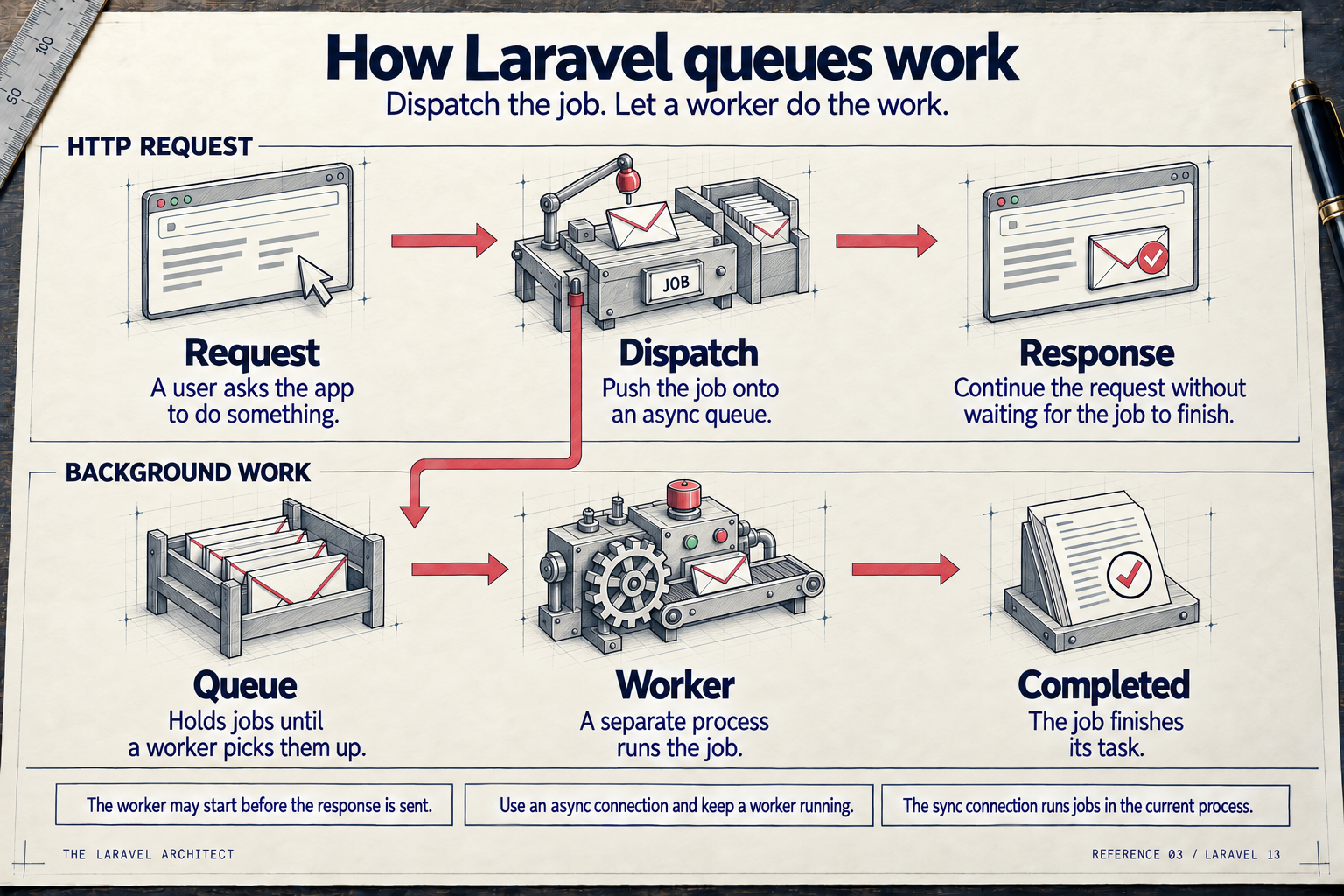
The request hands work to the queue. A separate worker picks it up, possibly before the HTTP response is sent.
Open the full-size queues reference card.
The top lane is what the person using the application is waiting for. The bottom lane is what the application still owes them.
That second lane needs an actual worker. The drawing doesn't make it run. Neither does putting a class in app/Jobs.
Dispatch Means the Work Was Handed Off
On an asynchronous queue connection, dispatching a queued job hands it to the queue backend. It doesn't wait for the worker to finish the business operation.
For a contact form, I want the request to validate the submission, save the inquiry, and arrange delivery. The user doesn't need to sit there while the mail provider responds.
But the response should describe what I know. I can acknowledge receiving the inquiry. I can't treat the request's success as proof that the notification reached an inbox.
That distinction matters for exports, imports, image processing, and other work too. A button labeled "Export complete" is wrong if the application has only queued the export. "We're preparing your export" tells the truth.
A Job Class Doesn't Guarantee Background Work
I check the dispatch mechanism and queue connection before assuming a job runs separately from the request.
A Laravel job intended for the queue normally implements ShouldQueue. The regular dispatcher uses that contract to decide whether to send it to a queue. Merely calling something a Job isn't the deciding factor.
Then the connection matters. The sync connection executes the job in the current process. The code can look like a dispatch while the user still waits for the job to finish.
For the card's two-lane flow, I'm talking about a worker-backed asynchronous connection, such as database or redis. Laravel 13 also has deferred and background drivers with different execution arrangements. Those aren't the flow this card is teaching.
I keep that scope explicit because "it's dispatched" is an incomplete answer to "does it run in the background?"
The Worker Is Part of the Feature
A queued job with no worker is work waiting to happen.
The connection tells Laravel where to put jobs. A queue name lets me separate work within that connection. The worker needs to listen to the connection and queue where the job actually landed.
A worker listening to default won't help a job waiting in emails unless its configuration includes that queue. I check both settings when a job appears to disappear.
On this site, the contact-email job explicitly uses the database connection, and production has a worker consuming it. I treat that worker as part of delivering the contact feature, not as a deployment detail I can remember later.
Long-running workers also need to pick up new code after a deployment. Leaving an old process running can mean the web request and the worker are using different versions of the application. The deployment process has to account for that.
The operational question is simple: what is consuming this job, and how will I know if it stops?
Queued Doesn't Mean After the Response
The worker may start before the browser gets the response. An asynchronous queue separates execution from the HTTP request; it doesn't promise a particular order between those two processes.
That is especially important when the job depends on a database write the request is still making.
Suppose a request creates an order inside a transaction and dispatches a job to Redis before committing. A worker may try to load the order while the transaction is still open. It may not be able to see the record yet.
Laravel supports dispatching after commit. When that is the appropriate design, I make the transaction boundary explicit rather than assuming the worker will be slow enough. The after_commit connection setting or a job's afterCommit() choice can defer enqueueing until the open transactions commit.
After commit and after the HTTP response are different boundaries. I don't use the names interchangeably.
There are other valid designs. This site's contact workflow inserts the inquiry and its job into the same database transaction, using the same database connection. The worker can't see the uncommitted job, and a failed enqueue rolls back the inquiry too. That is a specific arrangement, not a property every queue backend gives me.
Here's the transaction inside this site's contact action. The action has already checked that the database queue uses the application's database connection. $attributes contains the validated inquiry fields; ContactModels resolves the site's inquiry model.
return DB::transaction(
    function () use (
        $attributes
    ): Model&ContactInquiry {
        $inquiry = ContactModels::inquiry()::query()
            ->create($attributes);
        $key = $inquiry->getKey();

        if (! is_int($key)) {
            throw new LogicException(
                'Contact inquiries need an integer '
                . 'primary key.'
            );
        }

        dispatch(new SendContactInquiryEmails($key))
            ->beforeCommit();

        return $inquiry;
    }
);
The beforeCommit() call keeps the job insert inside the transaction. That's deliberate here: the inquiry and the queued job commit together. I wouldn't copy that choice to Redis, where pushing the job doesn't participate in this database transaction.
Plan for a Job to Be Attempted Again
I design a queued operation so another attempt doesn't blindly repeat everything it did last time.
Consider a job that sends two emails. The first send succeeds, the second fails, and the job is retried. Starting from the top without tracking progress can send the first email again.
The contact-email workflow on this site tracks the owner notification and sender confirmation separately. Each successful send gets its own timestamp. A retry attempts the delivery that's still missing.
That helps, but a local timestamp isn't the whole story. An external provider can accept a request before the application records its success. If the process stops in between, the application may not know the request succeeded.
That's why the provider's idempotency support matters too. This workflow supplies stable idempotency keys and limits automatic retries to the provider's supported window. I describe that as reducing duplicate delivery risk, not as a promise of exactly-once email.
The same question applies to any side effect: if this job runs again, what stops it from charging twice, creating another export, or repeating a notification? The answer belongs in the operation, not in a hopeful assumption that retries are rare.
Retries Need Limits and a Way to Notice Failure
Retrying forever isn't a recovery plan. Neither is giving up after the first temporary network problem.
I choose attempts, backoff, and timeouts based on the operation. A mail provider being briefly unavailable is different from an invalid recipient or a record that should no longer be processed.
The contact-email job here has three attempts and increasing backoff. Its job timeout is 60 seconds, below the database queue's 90-second retry interval. Keeping the timeout shorter helps avoid a second worker picking up work while the original worker is still running.
Those are this application's settings, not numbers I'd copy into every project. External calls need their own timeouts too; a worker limit doesn't replace configuring the HTTP client.
Once automatic recovery is exhausted, somebody needs a useful signal and a safe next step. In this contact workflow, incomplete delivery can be inspected and retried within its permitted window. Older cases go to manual review.
I want enough information to find the failure without filling logs with the visitor's message or other private data. "Job failed" is too little. Logging the entire payload is usually too much.
Check Enqueueing and Execution Separately
A test that proves a request dispatched a job doesn't prove the worker can perform it. I want evidence for both responsibilities.
At the request boundary, I check that the right work is queued when the submission succeeds, and that rejected input doesn't create it. Where saving and enqueueing must be atomic, that failure case matters too.
For the job, I check its behavior with isolated data and suitable fakes for external services. I include a repeated attempt and a partial failure, because those are the cases that expose duplicate side effects.
Then I check the operating system around it: the worker is running, it consumes the right queue, and failures are visible. A healthy HTTP endpoint alone doesn't prove a separate worker is healthy unless the application explicitly checks it.
I don't test an email job by sending messages to real customers. I don't call a queue healthy just because the form returned a redirect.
Decide What Has to Happen Before You Respond
My starting question is whether the user needs the result of the work to continue.
If they need the operation's result immediately, I either keep the necessary work in the request or build an interface that clearly handles waiting. Moving it into a queue without changing that expectation just moves the confusion.
If the work can happen later, I keep the request focused on accepting it safely. Then I make completion and failure observable.
Pick one queued operation in your application and check these four things:
- Connection and queue: I know where the job lands.
- Worker: A running worker consumes that connection and queue.
- Safe retries: Another attempt won't blindly repeat completed side effects.
- Completion and failure: I can tell whether the work finished and find failures.
Those answers tell me more than the presence of a Job class.
For connection options and the full framework behavior, see the official Laravel queue documentation.

Written by Jeffrey Davidson
Laravel developer and software architect sharing practical lessons from building and maintaining real applications.
More about JeffreyContinue reading

How I Decide What to Test in Laravel
I start with what a test should prove, then choose the boundary that can prove it. This is how I separate Unit, Integration, Feature and browser tests without making every test do the same job.

How I Handle Authorization in Laravel
I separate who a user is from what they're allowed to do. Gates and policies organize the permission rules, but the server still has to enforce them before the operation runs.

How I Follow a Request Through Laravel
I follow a request from Laravel's entry point to the route handler and back through middleware. Knowing where it can stop gives me a better place to start debugging.