How I Handle Authorization in Laravel
I separate who a user is from what they're allowed to do. Gates and policies organize the permission rules, but the server still has to enforce them before the operation runs.

On this page
A signed-in user can still be the wrong person to edit a record. That sounds obvious, but it's easy to lose the distinction when the page is behind login and the button only appears for administrators.
I want the server to answer a specific question before a protected operation: may this person perform this action on this resource? Knowing who they are is part of that decision. It isn't the whole decision.
The way I organize the answer depends on the app. A small publishing site and a business app with several roles don't need identical permission systems. They do need checks that hold up when someone sends the request without using the page I built for them.
Want the permission checks and checklist at a glance? Download the companion slides (PDF, 8 pages).
Identity Comes First, Permission Comes Next
Authentication establishes who is making the request. Authorization decides what that person may do.
For an example, imagine an app where two authors can sign in and write posts. Both accounts are valid. That doesn't automatically give one author permission to change the other's draft, publish it, or delete it. Those are separate abilities, and the application has to decide each one.
I find it easier to talk about a permission as a verb and a resource: view this post, update this post, publish this post. “Has access” is too vague once there is more than one thing a user can do.
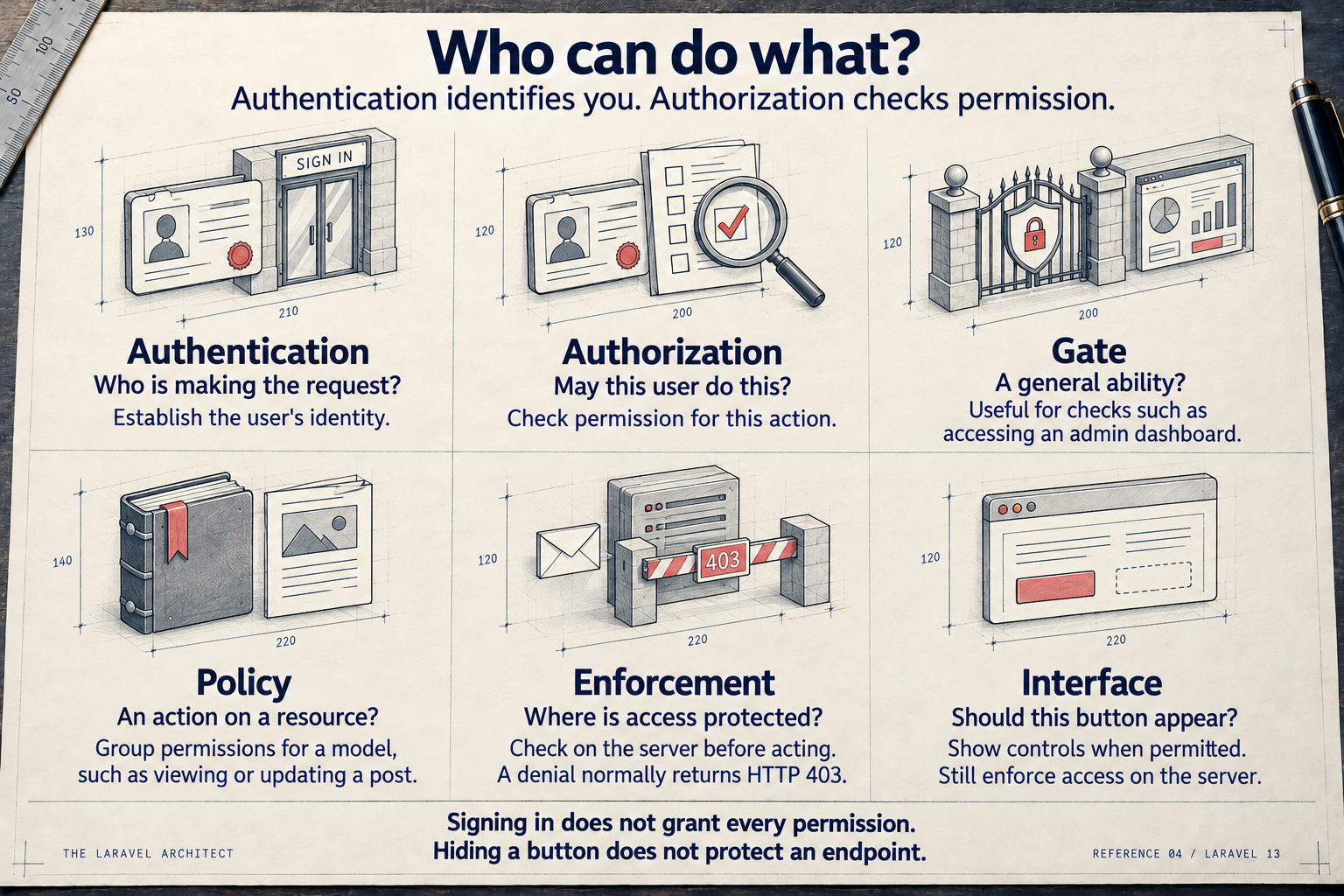
Identity, permission, enforcement and interface are separate responsibilities. Gates and policies help organize permission checks; they aren't successive checkpoints every request must pass.
Open the full-size authorization reference card.
The card starts with signing in because that's the familiar case. Public operations can also have an authorization rule. Laravel supports deliberately allowing guests in an appropriate gate or policy; I wouldn't add a login requirement to something intended for visitors just to make the drawing literal.
Put Related Permissions Together
My default for permissions around a model is a policy. It gives me one place to look when I need to understand who can view, create, update or delete that kind of record.
The benefit is mostly practical. If the same operation is available through a normal form and an interactive component, I don't want two versions of the permission rule drifting apart. Each entry point can ask the same policy about the same ability.
Some abilities don't have an existing record yet. Creating a post is an obvious example. A policy can answer that question using the model class; I don't need to manufacture an empty post just to have something to pass around.
A gate is useful for a general ability, such as whether someone may view an administrative dashboard. I don't need to create a dashboard model to justify that check. And using policies for posts doesn't stop me from using gates elsewhere.
Laravel's Gate API can also evaluate policy abilities. Calling a gate check doesn't mean the application has abandoned policies. The important part is where the permission rule lives and whether the caller actually uses it.
Check Before the Operation
I put the check at the server entry point before the protected operation runs.
That might be a route's authorization middleware, a Form Request's authorize() method calling a policy, or an explicit Gate::authorize() call. In an admin interface, I also need the framework's server-side action authorization to cover the operation. The right location depends on the flow already in the app.
I don't need to use every option for the same request. I need to be able to follow the request and point to the check that stops an unauthorized caller before data changes or private information leaves the server.
There is also a difference between asking and enforcing. A call that returns false doesn't help if the next line saves the record anyway. The caller must handle that answer, or use an authorization method that throws on denial.
Laravel normally turns an authorization exception into HTTP 403. A denial can use another response, including 404 when revealing that a record exists would be inappropriate. I choose that deliberately and test the result. A missing record and a forbidden record aren't always interchangeable just because the browser shows an error page for both.
The Button Is Part of the Interface
I still hide controls people can't use. Showing an Edit button that predictably fails is an annoying interface.
Blade's permission checks let the page use the same ability to decide whether the control belongs there. That keeps the interface in step with the server rule, instead of inventing a second condition that only looks equivalent today.
But hiding the button doesn't protect the operation. Someone can send the request directly, keep an old tab open, or arrive through another part of the app. The request still needs its own enforcement.
The page is a useful explanation of what the user can do. It isn't the authority on what the server will accept.
Permission and Business Rules Have Different Jobs
I keep “who may do this?” separate from “is this operation valid right now?”
For an illustrative order workflow, a staff member might have permission to cancel orders, while a shipped order can no longer be cancelled. The permission check belongs with authorization. The rule about the order's state belongs in the operation that performs the cancellation.
That operation needs to protect its rules when another entry point calls it too. Moving the state check into a controller would leave a command or queued job able to miss it.
The distinction can get fuzzy. A policy may reasonably consider a record's state when deciding whether to offer an ability. My concern is that the operation must still enforce the business rule it depends on. A visible button, or a permission decision made earlier, doesn't guarantee the record is still in the same state when the write happens.
This Site Keeps the Admin Rule Small
The Laravel Architect has a deliberately broad administrator role. This is the callback registered in AppServiceProvider, using App\Models\User and Laravel's Gate facade:
Gate::before(
    fn (User $user): bool => $user->is_admin
);
Administrators get an allow decision. Other authenticated users get a deny decision. The site has no per-model policies, and admission to the Filament admin panel also checks the administrator flag.
Capability limits, such as not creating subscribers through the panel, live on the resources. The broad gate cannot express those limits for an administrator because it has already allowed the ability.
That's a choice for this site's permission model. If administrators needed to stay inside their own workspace, this blanket allow would be too broad. A change in scope means revisiting the rule.
Be Careful With Before Hooks
A before hook can settle the permission decision before the ordinary gate or policy rule runs. Its return value matters:
true: Allow the ability without running the ordinary rule.false: Deny the ability without running the ordinary rule.null: Let the ordinary authorization check continue.
TLA's callback above is a complete allow-or-deny rule. In a super-admin bypass where ordinary users should still reach their policies, the fallback would be null. Returning false would stop those checks.
I want an override to say exactly which restrictions it bypasses. “Administrator” isn't a reason to ignore a workspace boundary, billing restriction, or operation the app never permits.
Test the Request Someone Shouldn't Be Able to Send
I want authorization tests to reach the protected operation, not just prove a button is absent.
For a record-based permission, I'd use an allowed user and an unauthorized user against the same operation. If the denial is meant to prevent a write, I also check that the stored record didn't change. If it protects a read, I check that the private content didn't appear in the response.
For an app with workspaces, I'd add a record from another workspace. A guessed identifier is useful test input. A valid login shouldn't turn it into a valid target.
This site's authorization tests check resource abilities for both administrator and non-administrator accounts. That matches its broad permission model. A more detailed model would need more detailed cases; I wouldn't treat one happy path as proof that every role is covered.
Start With One Protected Operation
When I'm reviewing authorization, I start with an actual operation and follow it all the way through:
- Identity: I know who is making the request and whether guests are allowed.
- Ability and resource: I can name the permission the server checks.
- Enforcement: A denial stops the operation before protected data is read or changed.
- Business rules: The operation enforces the rules that must still hold when it runs.
- Evidence: A test proves an unauthorized request can't read or change the protected data.
- Interface: The controls reflect the same permission the server enforces.
That's a manageable place to start, and it gives me something more useful than “the page requires login.”
The Laravel authorization documentation covers the available APIs. My first job is deciding what permission the application means to grant. The framework can enforce a rule, but I still have to give it the right one.

Written by Jeffrey Davidson
Laravel developer and software architect sharing practical lessons from building and maintaining real applications.
More about JeffreyContinue reading

How I Decide What to Test in Laravel
I start with what a test should prove, then choose the boundary that can prove it. This is how I separate Unit, Integration, Feature and browser tests without making every test do the same job.

How I Use Laravel Queues
I use queues to move work out of the request, but dispatching a job is only the handoff. I still need a worker, a safe retry, and a way to know whether the work finished.

How I Follow a Request Through Laravel
I follow a request from Laravel's entry point to the route handler and back through middleware. Knowing where it can stop gives me a better place to start debugging.